开通会员 尊享会员权益
登录
注册
找回密码
快速登录
QQ登录
微信登录
首页
产品中心
特惠
ZibBox子主题
建站笔记
子比主题
7B2主题
RiTheme
WP插件
绿色软件
实用
图片素材
精美
关于我们
About
用户协议
隐私政策
免责声明
友情链接
登录
注册
首页
产品中心
特惠
ZibBox子主题
建站笔记
子比主题
7B2主题
RiTheme
WP插件
绿色软件
实用
图片素材
精美
关于我们
About
用户协议
隐私政策
免责声明
友情链接
开通会员 尊享会员权益
登录
注册
找回密码
快速登录
QQ登录
微信登录
4.5W+
4281
2
更多资料
搜索内容
汇聚访
UID:1
已加入汇聚访333天
总消费:0
11枚徽章
河南省漯河市
管理员
关注
私信
文章
422
收藏
0
评论
9
粉丝
2
发布
422
排序
最新发布
最近更新
最多查看
最多点赞
最多回复
最多收藏
销售数量
2026-01-02
01-02
实用
子比主题 – 仿资源网广告小工具(第三版)
这是给子比主题适配的第三款的资源网广告小工具,此款和前两款不同的点在于可自定义设置广告,当然你也可以选择不设置广告,此小工具为苏晨原创的,我这里修复及重新适配了点东西,如果你对接的有自助广告位,使用此版本也是非常的方便,别的也不多说了,有需要的话自行部署吧! 演示效果: 更新内容: 优化PHP8.X版本兼容性问题 代码部署: [hidecontent type="payshow"] 定位:/wp-content/themes/zibll中把文章附件解压,然后在func.php文件里添加以下代码(没有这个文件自己创建一个,然后记得加php头,要不然会报错): $widgets_files = array( 'zibbox_third_zygg.php', /*小工具文件名*/ ); foreach ($widgets_files as $file) { require get_template_directory() . '/zibbox/widgets/' . $file; } 部署完代码之后到WP后台设置 – 外观 – 小工具 – 首页&顶部全宽度 – ZibBox...
1个月前
建站笔记
2025-09-14
09-14
实用
子比主题 – 文章上方推广样式代码
这是子比主题的推广样式代码,可以放在网站的任何位置,同时也适配了夜间模式,十分方便推荐,原作者是玩转网,有需要和喜欢的自行部署吧! 演示效果: 代码部署: [hidecontent type="reply"] 定位:WP后台–>>外观–>>自定义HTML,将下面的代码放里面即可,建议放到:文章页-主内容上面!当然你可以放在任何位置! <style> .huijuf-info-module-box,.huijuf-info-module-box *{margin:0 !important;padding:0 !important;font-size:1em !important;border:0 !important;width:auto !important;height:auto !important;-webkit-box-sizing:border-box !important;box-sizing:border-box !important;list-style:none !important;max-width:none !important;max-height:none !important;line-height:1 !important;background:0 0 !important}.huijuf-info-module-box{margin:1.5em 0 .8em 0 !important;max-width:100% !important;margin-left:auto !important;margin-right:auto !important}.huijuf-info-module-btn{display:inline-flex !important;height:2.4em !important;align-items:center !important;justify-content:center !important;padding:0 1em...
6个月前
建站笔记
2025-11-12
11-12
实用
Ri主题 – 顶部导航栏添加全局简繁体切换按钮
这是一款汇聚访适配Ri主题的顶部导航栏添加全局简繁体切换按钮,添加完代码后会在网站导航栏logo的右侧有一个繁简体切换按钮也是十分方便,按钮颜色你可以自行调节,话不多说需要的自行部署吧! 演示效果: 代码部署: [hidecontent type="payshow"] 定位:/wp-content/themes/ripro-v5/template-parts/header/menu.php找到下方代码(大概在10行之前): <?php get_template_part( 'template-parts/header/logo-wrapper'); ?> 随后在这段代码的下方添加以下代码: <div class="jelly-button"><a href="javascript:AutoHan()" id="AutoHan" style="color: white;">繁體</a></div> 随后定位:/wp-content/themes/ripro-v5/footer.php找到</footer>标签,在此标签下方添加以下代码: <script> /*汇聚访:www.huijuf.com*/ const currentLanguage = "traditional"; const conversionDelay = 200; function getBrowserLanguage() { const lang = navigator.language...
4个月前
建站笔记
2025-10-10
10-10
实用
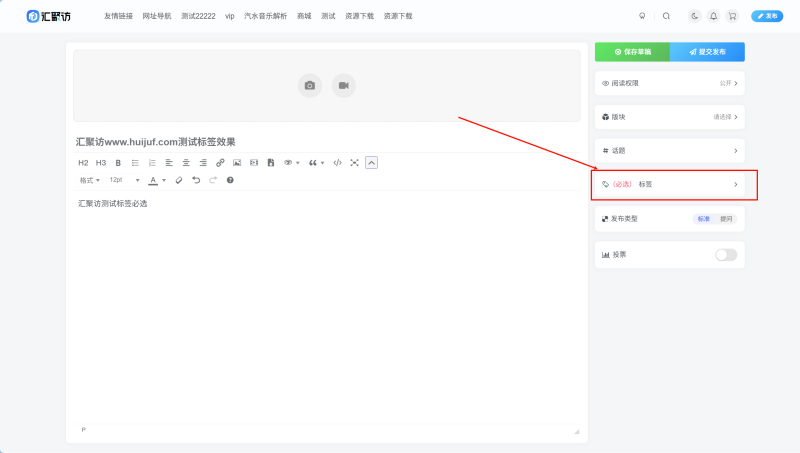
子比主题 – 论坛发帖标签必选功能
这是一款子比主题的论坛功能,主要是用于且方便一些使用前台编辑器的站长以及用户,添加上这个功能可以更加方便管理一些分类等,话不多说,有用得到的自行部署吧! 演示效果: 代码部署: [hidecontent type="reply"] 定位:/wp-content/themes/zibll/func.php,如果没有这个文件,记得自己创建一个,记得加上php头,要不然会报错! /** * 论坛发帖标签必选功能 * 此功能确保用户在发布论坛帖子时必须选择至少一个标签 */ function jipan_bbs_tag_required_early_check() { if ( defined('DOING_AJAX') && DOING_AJAX && isset($_REQUEST['action']) && $_REQUEST['action'] === 'bbs_posts_save' ) { global $zib_bbs; // 首先检查标题 $post_title = !empty($_REQUEST['post_title'])...
5个月前
建站笔记
2025-05-23
05-23
精美
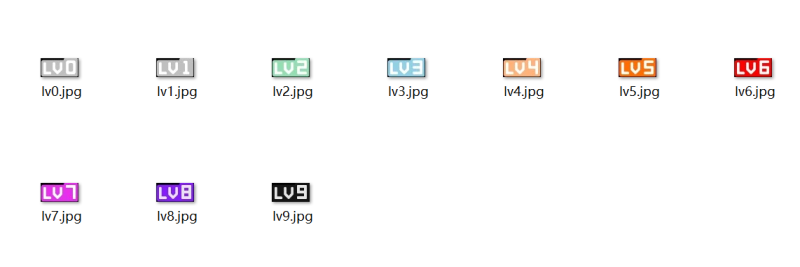
图片素材-用户等级图标素材
本图片素材是别人搞得,我收藏了下来,今天分享给大家吧! 演示效果: ...
10个月前
图文素材
2025-06-18
06-18
实用
子比主题 – 悬浮按钮简洁美化
今天给大家分享一个子比主题悬浮按钮的简洁版美化,希望对大家有帮助! 演示效果: 代码部署: [hidecontent type="reply"] .float-right .float-btn { color: #555; background-color: #fff; text-align: center; cursor: pointer; position: relative; border-radius: 4px; border-bottom: 1px solid #f8f8f8; box-shadow: 0 0px 6px 0 rgba(76, 86, 114, .12); width: 39px;...
9个月前
建站笔记
2025-10-01
10-01
实用
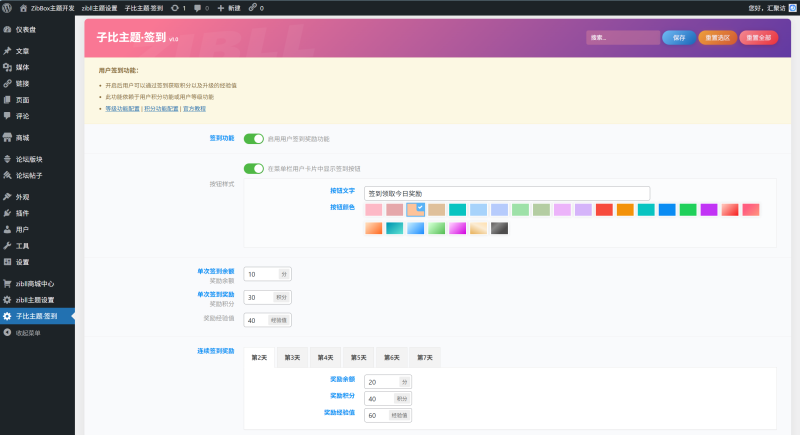
子比主题 – 网站签到奖励余额插件(两款)
这是两款子比主题的网站签到奖励余额插件,功能也比较简单配置起来也是非常快,主要适用于...
5个月前
功能插件
2025-11-13
11-13
实用
Ri主题 – 顶部导航栏登录按钮美化
这是RiProV5主题的一款顶部导航栏登录按钮美化,此效果是我在最骚的网站里看到的,于是就仿了一个出来,手机端以及黑夜模式也都进行了适配,背景颜色仍可自行更改,喜欢的自行部署吧! 演示效果: 代码部署: [hidecontent type="payshow"] action-hover.phpCSS 定位:/wp-content/themes/ripro-v5/template-parts/header/action-hover.php搜索登录你会看到下方这段代码: <a class="action-btn login-btn btn-sm btn" rel="nofollow noopener noreferrer" href="<?php echo esc_url( wp_login_url(get_current_url())); ?>"><i class="far fa-user me-1"></i><?php _e( '登录', 'ripro' );?></a> 随后复制下方的代码替换上方整段代码: <a class="login-link huijuf-login-btn" rel="nofollow noopener noreferrer" href="<?php...
4个月前
建站笔记
2025-05-06
05-06
实用
子比主题 – 昵称抖音风格字体美化代码
子比用户昵称加一个抖音故障风格字体的美化代码,看着挺不错的,记录一下日后使用。 演示效果: 代码部署: [hidecontent type="reply"] 代码部署就不用说了,css代码放到子比主题自定义css即可。 /*昵称*/.display-name{ text-shadow: -2px 0 rgba(0, 255, 255, .5), 2px 0 rgba(255, 0, 0, .5); animation: shake-it .5s reverse infinite cubic-bezier(0.68, -0.55, 0.27, 1.55);}@keyframes shake-it{ 0%{ text-shadow: 0 0 rgba(0,...
10个月前
建站笔记
2026-01-16
01-16
实用
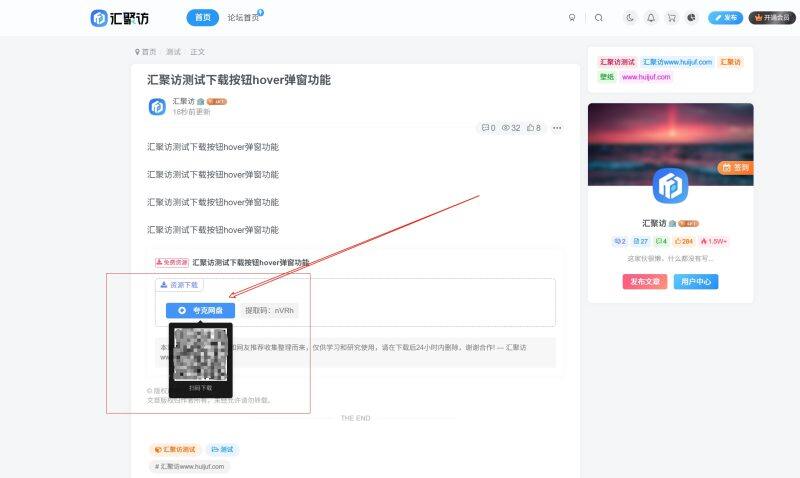
子比主题 – 下载按钮hover弹窗功能
这是一款子比主题下载按钮hover弹窗功能,部署此功能之前你需要注意当此功能部署完之后,这个如果用户扫描二维码下载资源之后,是不扣资源限制次数的,介意的话就不用这个功能,需要的自行部署吧! 演示效果: 代码部署: [hidecontent type="reply"] 定位:/wp-content/themes/zibll/func.php,没有这个文件自己创建一个,然后记得加php头,要不然会报错,将下面的代码放里面! // AJAX接口:生成二维码(带缓存) add_action('wp_ajax_get_download_qrcode','custom_get_download_qrcode'); add_action('wp_ajax_nopriv_get_download_qrcode','custom_get_download_qrcode'); function custom_get_download_qrcode(){ if(empty($_GET['url'])){die();} $url=urldecode($_GET['url']); $cache_key='qr_'.md5($url); $cached=get_transient($cache_key); if($cached){ header('Content-Type: image/png'); header('Cache-Control: max-age=86400'); echo base64_decode($cached); die(); } ob_clean(); require_once get_theme_file_path('/inc/class/qrcode.class.php'); ob_start(); QRcode::png($url,false,'L',4,1); $img=ob_get_clean(); set_transient($cache_key,base64_encode($img),DAY_IN_SECONDS); header('Content-Type: image/png'); header('Cache-Control:...
1个月前
建站笔记
上一页
1
…
31
32
33
34
35
…
43
下一页
跳转
欢迎光临~
随便逛逛
博客标签
新窗口打开
复制链接地址
复制选中文本
粘贴文本
站内搜索
百度搜索
复制此图片
下载此图片
用户协议
免责声明
复制地址
关闭热评
轉為繁體
切换模式
热评
登录
没有账号?立即注册
邮箱
验证码
发送验证码
记住登录
账号密码登录
登录
用户名或邮箱
登录密码
记住登录
找回密码
|
免密登录
登录
社交账号登录
QQ登录
微信登录
使用社交账号登录即表示同意
用户协议
、
隐私声明
注册
已有账号,立即登录
设置用户名
邮箱
验证码
发送验证码
设置密码
注册
已阅读并同意
用户协议
、
隐私声明
扫码登录
使用
其它方式登录
或
注册
扫码登录
扫码登录即表示同意
用户协议
、
隐私声明
最近因事业繁忙,随缘更新
如有不便,敬请谅解!
开通会员享特权
专属内容无限访问
下载权限提升至最高级
专属子比付费美化优惠
免费下载更多精品资源
¥29.9
¥39.9
Vip会员 · 立省30元
立即开通
每日签到
在线
扫码关注公众号
获取更多专属内容和最新资讯
展开全屏
返回顶部






 汇聚访
汇聚访