开通会员 尊享会员权益
登录
注册
找回密码
快速登录
QQ登录
微信登录
首页
产品中心
特惠
ZibBox子主题
建站笔记
主题美化
子比主题
RiTheme
B2主题
精美素材
图文素材
插件相关
WP插件
绿色软件
实用
关于我们
About
用户相关
用户协议
隐私政策
免责声明
儿童个人信息保护声明
个人信息保护咨询指引
服务相关
广告合作协议
侵权投诉指引
软件许可协议
文章版权声明
站点聚合统计
站点相关
小黑屋
友情链接
赞助发电
正版查询
简体中文
English
한국어
日本語
登录
注册
简体中文
English
한국어
日本語
首页
产品中心
特惠
ZibBox子主题
建站笔记
主题美化
子比主题
RiTheme
B2主题
精美素材
图文素材
插件相关
WP插件
绿色软件
实用
关于我们
About
用户相关
用户协议
隐私政策
免责声明
儿童个人信息保护声明
个人信息保护咨询指引
服务相关
广告合作协议
侵权投诉指引
软件许可协议
文章版权声明
站点聚合统计
站点相关
小黑屋
友情链接
赞助发电
正版查询
开通会员 尊享会员权益
登录
注册
找回密码
快速登录
QQ登录
微信登录
更多资料
搜索内容
迷小龙丶H
UID:152
已加入汇聚访328天
总消费:323.00
3枚徽章
广东省潮州市
关注
私信
文章
0
收藏
17
评论
23
粉丝
0
文章
17
商品
0
排序
收藏时间
最新发布
最近更新
最多查看
最多点赞
最多回复
最多收藏
销售数量
子比主题 – 渐变首页栏目美化
今天给大家分享一个渐变的首页栏目,之前写了一篇二次元美化的,今天给大家分享一下这个效果!原创应该是炙焰!我也算是记录一下,防治效果丢失! 演示效果: 代码部署: [hidecontent type="payshow"] 直接把下方代码放到后台子比设置-自定义css样式即可! .index-tab ul>li{border-radius:7px;background:none;color:#000;transition:background-color .5s ease}.index-tab ul>li.active{background:linear-gradient(45deg,var(--gradient-active));background-size:400% 400%;animation:GradientShift 15s ease infinite}@keyframes GradientShift{0%{background-position:0 50%}50%{background-position:100% 50%}to{background-position:0 50%}} :root { --gradient-base-1: 255,127,80; --gradient-base-2: 148,143,255; --gradient-base-3: 76,175,80; --gradient-base-4: 255,165,0; --gradient-active: rgba(var(--gradient-base-1),0.3) 0%,rgba(var(--gradient-base-2),0.3) 25%,rgba(var(--gradient-base-3),0.3) 50%,rgba(var(--gradient-base-4),0.3) 75%,rgba(var(--gradient-base-1),0.3)...
建站笔记
0
154
12
子比主题 – F12顶部提示框效果美化
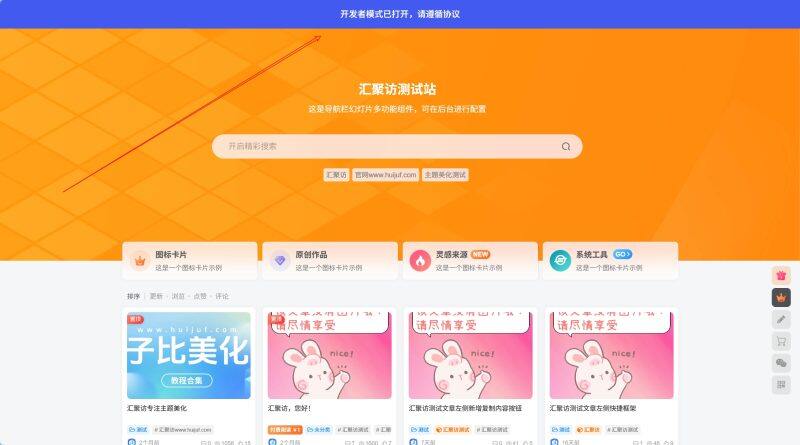
这是一款给子比主题适配的网站顶部提示框,这款是从张洪Heo博客里复刻到子比主题的,其他主题应该也是可以正常使用的,相关提示颜色以及文字颜色都可在代码中进行修改,有需要的自行部署吧! 演示效果: 代码部署: [hidecontent type="payshow"] 自定义CSS代码自定义javascript代码 定位:子比主题设置–>>自定义代码–>>自定义 CSS 样式添加以下代码即可: #huijuf_dev-tool-alert{position:fixed;top:0;left:0;width:100%;height:60px;z-index:9998;overflow:hidden;background-color:#425aef;display:flex;align-items:center;justify-content:center;transform:translateY(-100%);transition:transform .5s ease-out}#huijuf_dev-tool-alert.huijuf_show{transform:translateY(0)}#huijuf_dev-tool-alert.huijuf_exit{transform:translateY(-100%);transition:transform .3s ease-in}.huijuf_alert-content{color:#fff;font-size:18px;font-weight:500;text-align:center;padding:0 20px} 定位:后台子比主题设置–>>自定义代码–>>自定义 javascript中添加以下代码: function huijuf_createAlert(){if(document.getElementById('huijuf_dev-tool-alert'))return;const huijuf_alert=document.createElement('div');huijuf_alert.id='huijuf_dev-tool-alert';const huijuf_content=document.createElement('div');huijuf_content.className='huijuf_alert-content';huijuf_content.textContent='开发者模式已打开,请遵循协议';huijuf_alert.appendChild(huijuf_content);document.body.appendChild(huijuf_alert);return huijuf_alert}let huijuf_alertShown=false;let huijuf_hideTimeout=null;function huijuf_showAlert(){if(huijuf_alertShown)return;const huijuf_devToolAlert=huijuf_createAlert();huijuf_alertShown=true;huijuf_devToolAlert.classList.remove('huijuf_exit');setTimeout(()=>{huijuf_devToolAlert.classList.add('huijuf_show')},10);setTimeout(()=>{huijuf_hideAlert()},2500)}function huijuf_hideAlert(){if(huijuf_hideTimeout){clearTimeout(huijuf_hideTimeout);huijuf_hideTimeout=null}const huijuf_devToolAlert=document.getElementById('huijuf_dev-tool-alert');if(!huijuf_devToolAlert)return;huijuf_devToolAlert.classList.add('huijuf_exit');huijuf_hideTimeout=setTimeout(()=>{huijuf_devToolAlert.classList.remove('huijuf_show');huijuf_devToolAlert.classList.remove('huijuf_exit');huijuf_alertShown=false;huijuf_devToolAlert.remove()},300)}document.addEventListener('keydown',function(huijuf_event){if(huijuf_event.keyCode===123){huijuf_showAlert();return false}}); [/hidecontent]
建站笔记
3
188
7
子比主题 – 简约分类专题标签色调美化
今天给大家分享一个子比主题的分类样式的简约美化,每个人眼光不同,这种就比较简约,适合一些比较正式的站点使用吧!今天分享给大家!还有一点,鼠标悬浮专题分类或是标签上还有不同的颜色变化哦! 演示效果: 代码部署: [hidecontent type="payshow"] 还是一样,代码直接放到子比主题后台设置->自定义代码->自定义CSS样式即可! /*汇聚访:www.huijuf.com*/ .posts-item.card .item-tags .but, .posts-item.card .meta-category a { position: relative !important; overflow: hidden !important; z-index: 1 !important; display: inline-block !important; padding: 4px 10px !important; margin: 0 6px 8px 0...
建站笔记
0
151
5
子比主题 – 用户个人中心小工具美化
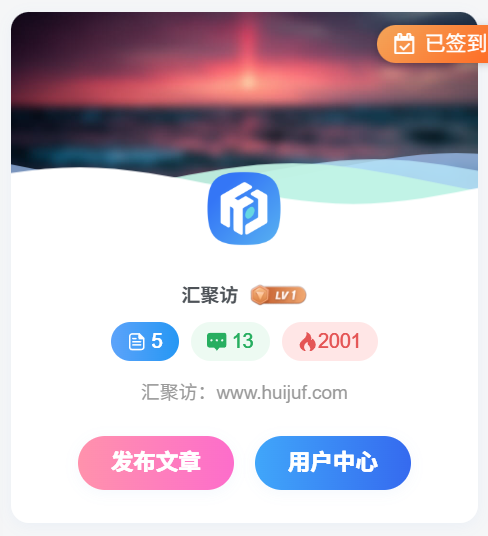
大家好,今天汇聚访给大家带来这一款zibll主题的用户个人中心小工具的美化教程,这个效果我依旧是在腾飞的网站上看到的,腾飞没发教程,我觉得好看就仿了一个,效果大致一样吧,总之大差不差吧,该教程需要修改主题源文件,请大家使用前先备份,以防主题文件丢失或网站程序崩溃,话不多说,直接开始部署教程! 演示效果: 代码部署: [hidecontent type="payshow"] 第一步: 首先在Zibll主题设置-自定义CSS样式中添加以下代码(注:之前发过那两个按钮的美化教程,本贴内的CSS样式中不再含有相关代码,请自行去那个文章里寻找,那个文章我会放到本文章的底部。): .user-card { border-radius: 12px; overflow: hidden; background: #fff; box-shadow: 0 2px 10px rgba(71,135,236,.06); margin-bottom: 20px; } /*汇聚访:www.huijuf.com*/ .widget-user { padding: 0 !important; background: 0 0 !important; } /*汇聚访:www.huijuf.com*/...
建站笔记
0
228
13
子比主题 – 滚动推荐卡片小工具(第二版)
这是一款子比主题的滚动推荐卡片小工具,今天发的这个版本是这个小工具的第二版本,适配了一些不同尺寸的电子设备,同时在右侧的卡片添加了气泡上浮的一个效果也是非常的好看,还有几个不同的版本,后续我也会发出来,话不多说喜欢的自行部署吧! 演示效果: 代码部署: [hidecontent type="payshow"] 首先第一步定位:/wp-content/themes/zibll/func.php文件,如果没有这个文件自己创建在子比目录创建一个,创建之后记得加php头,要不然会报错!随后添加以下代码: $widgets_files = array( 'ZibBox_customtwo.php', /*小工具文件名*/ ); foreach ($widgets_files as $file) { require get_template_directory() . '/zibbox/widgets/' . $file; } 添加完随后在文章下载相关附件,之后解压到/wp-content/themes/zibll即可! [/hidecontent]
建站笔记
0
146
6
子比主题 – 首页大屏视频展示
大家好,今天汇聚访给大家带来一款首页大屏视频展示,这个效果起初我是在大绵羊博客看到的,他的首页就是,感觉挺好看的,他只适配了7b2主题,今天我闲的无聊,就适配了一下子比主题,这个美化效果感觉中规中矩吧,话不多说,直接开始部署教程! 演示效果: 代码部署: [hidecontent type="payshow"] 首先在/wp-content/themes/zibll/index.php这个文件下找到:get_header();这个函数,在这个函数?>的下面添加以下代码: <div class="dmy-homevideo"> <div class="ying-homevideo-content ying-homevideo-orientation "> <section class="ying-homevideo-offvideo home-video"> <div class="ying-homevideo-top"> <video id="myVideo" autoplay="" playsinline="" loop="" muted="" src="https://cccimg.com/view.php/795d9ef9b8ccafecebf3a37e d6d2d29b.mp4" width="600" __idm_id__="1048577"> </video> </div> <div class="ying-homevideo-filters"> </div> <div class="ying-dmyblog"> <p class="ying-dmyblogtitle">汇聚访</p>...
建站笔记
0
143
10
子比主题 – logo透明过渡美化样式
这是给子比主题得的logo添加的一款透明过渡的美化样式,这个效果是腾飞参考别的网站的样式来适配子比主题的,之前我也发过几款logo样式的美化,话不多说有喜欢的自行部署吧! 演示效果: 代码部署: [hidecontent type="reply"] 定位:子比主题–>>自定义CSS样式,把下方代码放入即可: /*汇聚访:www.huijuf.com*/ .navbar-brand { position: relative; } .navbar-logo img { position: relative; display: inline-block; animation: logoShine 2s infinite ease-in-out; } @keyframes logoShine { 0% { transform: translateX(0); opacity: 1; }...
建站笔记
6
134
11
子比主题 – 分类栏目美化(两款)
网站分类栏目美化的意义主要体现在提升用户体验和视觉吸引力,以及优化搜索引擎排名等方面。本文章将给大家分享两种分类栏目美化的教程哦~ 演示效果①: 演示效果②: 代码部署: [hidecontent type="reply"] 将下方代码加入到后台CSS里即可!图片放在帖子附件里了,可自行下载! 效果①效果② .index-tab ul>li.active { color: #ffffff00 !important; background-color: #ffffff00 !important; border-radius: 6px; z-index: 1; position: relative; height: 39px; line-height: 44px; background: url(https://img.dmguo.cn/2025/01/20250120091106173.png); background-repeat: no-repeat; -webkit-background-size: 91px 39px; -moz-background-size:...
建站笔记
4
130
14
子比主题 – 首页Tab栏目美化
这是子比主题的一款首页Tab栏目美化,之前发过类似的只不过是附加图片效果样式的,今天给大家带来这个是仅用代码实现的,汇聚访这里测试了一下夜间模式也是挺不错的,同时在这提醒下各位搬运的,麻烦带上本站文章出处,喜欢的自行部署吧! 演示效果: 代码部署: [hidecontent type="reply"] 将下面的代码放到:子比主题–>>自定义CSS样式即可! /*汇聚访:www.huijuf.com*/ .index-tab { padding: 5px 8px; background: transparent; border-radius: 0; } .index-tab ul { margin: 0; padding: 0; list-style: none; } /*汇聚访:www.huijuf.com*/ .index-tab ul>li { display: inline-block; padding: 3px...
建站笔记
24
212
11
子比主题 – 悬浮按钮简洁美化
今天给大家分享一个子比主题悬浮按钮的简洁版美化,希望对大家有帮助! 演示效果: 代码部署: [hidecontent type="reply"] .float-right .float-btn { color: #555; background-color: #fff; text-align: center; cursor: pointer; position: relative; border-radius: 4px; border-bottom: 1px solid #f8f8f8; box-shadow: 0 0px 6px 0 rgba(76, 86, 114, .12); width: 39px;...
建站笔记
6
129
7
1
2
下一页
随便逛逛
博客标签
文章标签
新窗口打开
复制链接地址
复制选中文本
粘贴文本
站内搜索
百度搜索
复制图片地址
下载此图片
用户协议
免责声明
复制地址
转为繁体
切换模式
登录
没有账号?立即注册
邮箱
验证码
发送验证码
记住登录
账号密码登录
登录
用户名或邮箱
登录密码
记住登录
找回密码
|
免密登录
登录
社交账号登录
QQ登录
微信登录
使用社交账号登录即表示同意
用户协议
、
隐私声明
注册
已有账号,立即登录
设置用户名
邮箱
验证码
发送验证码
设置密码
注册
已阅读并同意
用户协议
、
隐私声明
扫码登录
使用
其它方式登录
或
注册
扫码登录
扫码登录即表示同意
用户协议
、
隐私声明
开通会员享特权
专属内容无限访问
下载权限提升至最高级
专属子比付费美化优惠
免费下载更多精品资源
¥29.9
¥39.9
Vip会员 · 立省30元
立即开通
每日签到
在线
扫码关注公众号
获取更多专属内容和最新资讯
展开全屏
返回顶部