开通会员 尊享会员权益
登录
注册
找回密码
快速登录
QQ登录
微信登录
首页
产品中心
特惠
ZibBox子主题
建站笔记
子比主题
7B2主题
RiTheme
WP插件
绿色软件
实用
图片素材
精美
关于我们
About
用户协议
隐私政策
免责声明
友情链接
登录
注册
首页
产品中心
特惠
ZibBox子主题
建站笔记
子比主题
7B2主题
RiTheme
WP插件
绿色软件
实用
图片素材
精美
关于我们
About
用户协议
隐私政策
免责声明
友情链接
开通会员 尊享会员权益
登录
注册
找回密码
快速登录
QQ登录
微信登录
4.5W+
4281
2
更多资料
搜索内容
汇聚访
UID:1
已加入汇聚访332天
总消费:0
11枚徽章
河南省漯河市
管理员
关注
私信
文章
422
收藏
0
评论
9
粉丝
2
发布
422
排序
最新发布
最近更新
最多查看
最多点赞
最多回复
最多收藏
销售数量
2025-04-28
04-28
实用
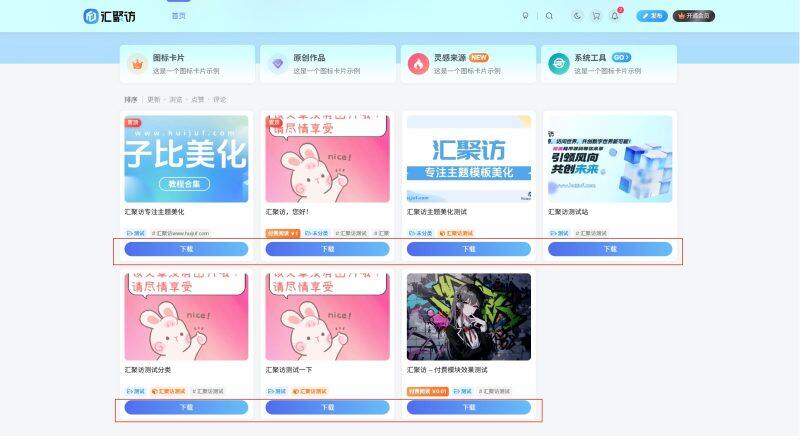
子比主题 – 文章卡片下载按钮样式美化
给子比主题卡片样式下面加一个下载按钮样式,非常美观,给自己的子比主题去加一个吧,这个非常实用,这个代码是扒mac站长的一个美化,所以我分享给大家免费使用! 演示效果: 代码部署: [hidecontent type="reply"] 首先一共三步,有两个php代码和一个css代码,话不多说直接开始教程! PHPCSS 第一步:搜索zib_get_posts_list_meta或者是注释//获取文章列表的底部meta这个注释然后在这个函数内部加上以下代码,大概放在265行左右: $get_permalink = get_permalink();//添加文章链接 随后将下面的PHP代码放到子比文件:/wp-content/themes/zibll/inc/functions/zib-posts-list.php的大概320多行,如下图! $html = '<a class="down" target="_blank" href="' . $get_permalink . '" rel="external nofollow" >下载</a>';//添加下载按钮 CSS代码我就不说了,直接放到子比主题-->>自定义CSS样式即可! /*下载按钮www.huijuf.com*/ a.down { display: inline-block; width: 100%; height: 30px;...
11个月前
建站笔记
2025-06-09
06-09
实用
子比主题 – 全局B2弹窗提醒样式美化
这个是子比主题全局B2弹窗提醒样式的美化,可以看本站的复制、签到等等更多按钮,就是把子比默认的弹窗替换了B2样式美化,部署之前要确保之前没有引入过其他的弹窗样式,话不多说直接开始! 演示效果: 代码部署: [hidecontent type="reply"] 一共三个地方的代码,跟着我的步骤走不会有问题,确保之前没有部署过其他的弹窗样式! CSS自定义底部HTML 放在子比主题–>>自定义CSS样式即可! /*弹窗提醒*/ .qmsg.qmsg-wrapper { box-sizing:border-box; margin:0; padding:0; font-size:13px; font-variant:tabular-nums; line-height:1; list-style:none; font-feature-settings:"tnum"; position:fixed; top:136px; left:0; z-index:9999999; width:100%; pointer-events:none; color:#000; } .qmsg .qmsg-item { padding:8px; text-align:center; -webkit-animation-duration:.3s; animation-duration:.3s; position:relative;...
9个月前
建站笔记
2025-07-22
07-22
实用
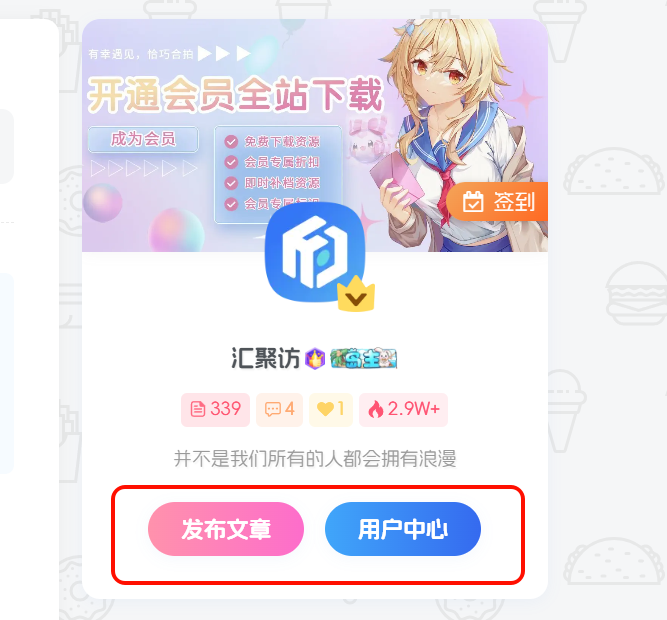
子比主题 – 用户信息小工具底部两个按钮美化
今天汇聚访给大家带来用户信息小工具底部两个按钮的美化教程,这个效果最开始是在腾飞博客看到的,个人感觉挺好看的,于是就扒了下来,今天就分享给大家吧,每个人的观感不同,自己觉得好看的自行部署吧!代码部分我发了两个版本,一个压缩版和一个未压缩自行部署。 演示效果: 代码部署: [hidecontent type="reply"] 定位:子比后台设置 - 自定义CSS样式中添加以下代码: 压缩版未压缩 /*汇聚访:www.huijuf.com*/ .user-btns { margin-top: 20px !important; display: flex; justify-content: center; align-items: center; gap: 14px; flex-wrap: wrap; padding-bottom: 4px; } /*汇聚访:www.huijuf.com*/ .user-btns .btn-newadd, .user-btns .jb-pink { background:...
8个月前
建站笔记
2025-11-30
11-30
实用
子比主题 – 文章列表多种动画效果美化(四款)
这是一款子比主题的文章列表多种动画效果美化,此效果依旧是我们的老墨根据一为主题的文章列表加载动效所研究,加上这个效果可以使子比主题的文章列表更具有灵动性看起来更生动,话不多说喜欢的自行部署吧! 演示效果: 第一款 第二款 第三款 第四款 代码部署: [hidecontent type="reply"] 无论是哪一款,代码都是直接放在主题后台设置 - 自定义CSS代码样式中的!代码已进行压缩! 第一款第二款第三款第四款 .posts-item{animation:floatUp 0.8s ease forwards}@keyframes floatUp{0%{opacity:0;transform:translateY(30px)}100%{opacity:1;transform:translateY(0)}} .posts-item{animation:floatUpBounce 0.9s ease forwards}@keyframes floatUpBounce{0%{opacity:0;transform:translateY(30px)}70%{opacity:1;transform:translateY(-10px)}100%{opacity:1;transform:translateY(0)}} .posts-item{animation:floatUpScale 0.7s ease forwards}@keyframes floatUpScale{0%{opacity:0;transform:translateY(30px) scale(0.9)}100%{opacity:1;transform:translateY(0) scale(1)}} .posts-item{animation:floatUpRotate 0.8s ease forwards}@keyframes floatUpRotate{0%{opacity:0;transform:translateY(30px)...
4个月前
建站笔记
2025-09-27
09-27
实用
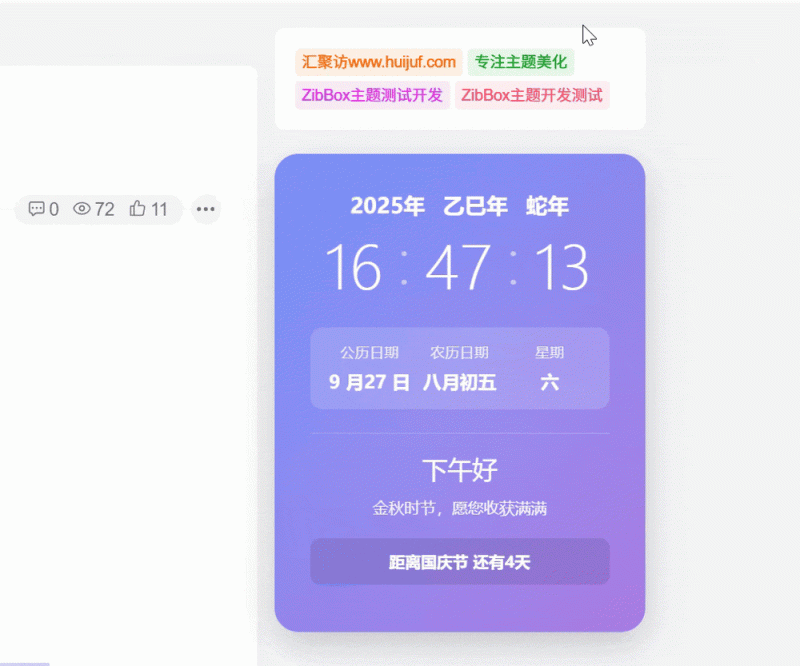
子比主题 – 侧边动态时钟样式美化(两款)
这是子比主题的一款小工具样式,推荐放在子比主题的侧边栏位置,一共两款样式同时适配了黑夜模式,喜欢哪个样式自行部署即可,不要同时部署,会出问题!!有喜欢的自行部署吧! 演示效果¹(白天渐变昼夜黑色) 演示效果²(白天白色昼夜黑色) 代码部署: [hidecontent type="reply"] 喜欢哪一款部署哪一款,不要两个都部署,要不然白天的颜色都会变成白色! 定位:WP后台–>>外观–>>小工具–>>自定义HTML,把下方样式的代码放进去即可! 样式一(渐变+黑色)样式二(白色+黑色) <style> .dynamic-clock { background: linear-gradient(135deg, #6e8efb, #a777e3); border-radius: 20px; padding: 30px; box-shadow: 0 10px 30px rgba(0, 0, 0, 0.2); margin: 20px auto; max-width: 500px; color: white;...
6个月前
建站笔记
2025-12-14
12-14
实用
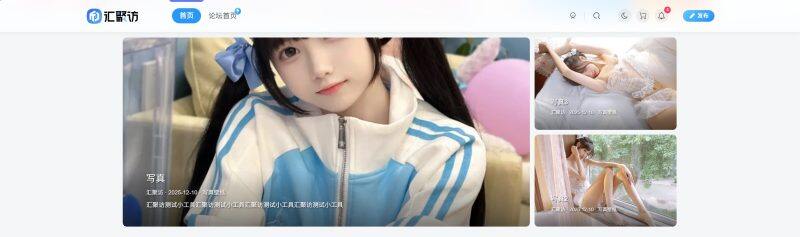
子比主题 – 新文章轮播小工具
这是一款适配于子比主题的新文章轮播小工具,此小工具是左一右二排列的,同时此小工具还可以自定义轮播的文章ID以及是否显示作者、日期等相关信息,同时还可以单独设置每个轮播组件的切换效果,有需要的朋友自行部署吧! 演示效果: 代码部署: [hidecontent type="reply"] 定位:/wp-content/themes/zibll/func.php添加以下代码即可: Zib_CFSwidget::create('zib_widget_new_carousel',array('title'=>'New轮播图','zib_title'=>true,'zib_affix'=>true,'zib_show'=>true,'description'=>'左侧轮播+右侧双栏,支持5种切换效果','fields'=>array(array('id'=>'height','type'=>'number','title'=>'模块高度','default'=>400,'unit'=>'px'),array('id'=>'right_width','type'=>'number','title'=>'右侧宽度','default'=>300,'unit'=>'px'),array('id'=>'left_posts','type'=>'text','title'=>'左侧文章ID','desc'=>'多个用逗号分隔,留空自动获取'),array('id'=>'right_top_posts','type'=>'text','title'=>'右上文章ID','desc'=>'多个用逗号分隔,留空自动获取'),array('id'=>'right_bottom_posts','type'=>'text','title'=>'右下文章ID','desc'=>'多个用逗号分隔,留空自动获取'),array('id'=>'left_effect','type'=>'select','title'=>'左侧切换效果','options'=>array('slide'=>'滑动','fade'=>'淡出淡入','cube'=>'3D方块','coverflow'=>'3D滑入','flip'=>'3D翻转'),'default'=>'slide'),array('id'=>'right_top_effect','type'=>'select','title'=>'右上切换效果','options'=>array('slide'=>'滑动','fade'=>'淡出淡入','cube'=>'3D方块','coverflow'=>'3D滑入','flip'=>'3D翻转'),'default'=>'fade'),array('id'=>'right_bottom_effect','type'=>'select','title'=>'右下切换效果','options'=>array('slide'=>'滑动','fade'=>'淡出淡入','cube'=>'3D方块','coverflow'=>'3D滑入','flip'=>'3D翻转'),'default'=>'fade'),array('id'=>'autoplay','type'=>'switcher','title'=>'自动播放','default'=>true),array('id'=>'interval','type'=>'number','title'=>'播放间隔(秒)','default'=>4,'dependency'=>array('autoplay','==',true)),array('id'=>'show_info','type'=>'checkbox','title'=>'显示信息','inline'=>true,'options'=>array('show_author'=>'作者','show_date'=>'日期','show_category'=>'分类','show_tags'=>'标签'),'default'=>array('show_author','show_date','show_category')),array('id'=>'text_style','type'=>'fieldset','title'=>'文字样式','inline'=>true,'fields'=>array(array('id'=>'title_length','type'=>'number','title'=>'标题字数','default'=>30),array('id'=>'excerpt_length','type'=>'number','title'=>'摘要字数','default'=>50),array('id'=>'text_shadow','type'=>'switcher','title'=>'文字阴影','default'=>true)))))); function zib_widget_new_carousel($args,$instance){if(!Zib_CFSwidget::show_class($instance))return;$cfg=array_merge(array('height'=>400,'right_width'=>300,'left_effect'=>'slide','right_top_effect'=>'fade','right_bottom_effect'=>'fade','autoplay'=>true,'interval'=>4,'show_info'=>array(),'text_style'=>array()),$instance);$show_cfg=array_flip($cfg['show_info']);$posts=array('left'=>nc_get_posts($cfg['left_posts']??'',5),'top'=>nc_get_posts($cfg['right_top_posts']??'',3),'bottom'=>nc_get_posts($cfg['right_bottom_posts']??'',3));if(!array_filter($posts))return;$id='nc-'.uniqid();$shadow=($cfg['text_style']['text_shadow']??true)?'text-shadow:1px 1px 2px rgba(0,0,0,0.8);':'';Zib_CFSwidget::echo_before($instance);echo'<div class="new-carousel-wrap" id="'.$id.'">';$areas=array('left'=>array('height'=>$cfg['height'],'class'=>'nc-left-wrap','pagination'=>true,'button'=>true,'effect'=>$cfg['left_effect'],'interval'=>$cfg['interval']*1000),'top'=>array('height'=>($cfg['height']-10)/2,'class'=>'nc-right-top-wrap','pagination'=>true,'button'=>false,'effect'=>$cfg['right_top_effect'],'interval'=>$cfg['interval']*1000+1000),'bottom'=>array('height'=>($cfg['height']-10)/2,'class'=>'nc-right-bottom-wrap','pagination'=>true,'button'=>false,'effect'=>$cfg['right_bottom_effect'],'interval'=>$cfg['interval']*1000+2000));if($posts['left']){echo'<div class="nc-left-wrap">';nc_render_slider($posts['left'],$areas['left'],$show_cfg,$cfg['text_style'],true);echo'</div>';}if($posts['top']||$posts['bottom']){echo'<div class="nc-right-wrap">';if($posts['top']){echo'<div class="nc-right-top-wrap">';nc_render_slider($posts['top'],$areas['top'],$show_cfg,$cfg['text_style'],false);echo'</div>';}if($posts['bottom']){echo'<div class="nc-right-bottom-wrap">';nc_render_slider($posts['bottom'],$areas['bottom'],$show_cfg,$cfg['text_style'],false);echo'</div>';}echo'</div>';}echo'</div><style>#'.$id.'{display:flex;gap:10px;height:'.$cfg['height'].'px;border-radius:8px;overflow:hidden}#'.$id.' .nc-left-wrap{flex:1;position:relative;border-radius:8px;overflow:hidden}#'.$id.' .nc-right-wrap{width:'.$cfg['right_width'].'px;display:flex;flex-direction:column;gap:10px}#'.$id.' .nc-right-top-wrap,#'.$id.' .nc-right-bottom-wrap{flex:1;position:relative;border-radius:8px;overflow:hidden}#'.$id.' .zib-slider{height:100%}#'.$id.' .new-swiper{height:100%;border-radius:8px;overflow:hidden}#'.$id.' .nc-right-top-wrap .swiper-pagination,#'.$id.' .nc-right-bottom-wrap .swiper-pagination{bottom:8px}#'.$id.' .nc-right-top-wrap .swiper-pagination-bullet,#'.$id.' .nc-right-bottom-wrap .swiper-pagination-bullet{width:6px;height:6px;margin:0 3px}#'.$id.' .swiper-slide::before{content:"";position:absolute;bottom:0;left:0;right:0;height:30%;background:linear-gradient(to top,rgba(0,0,0,0.5)...
3个月前
建站笔记
2025-05-01
05-01
实用
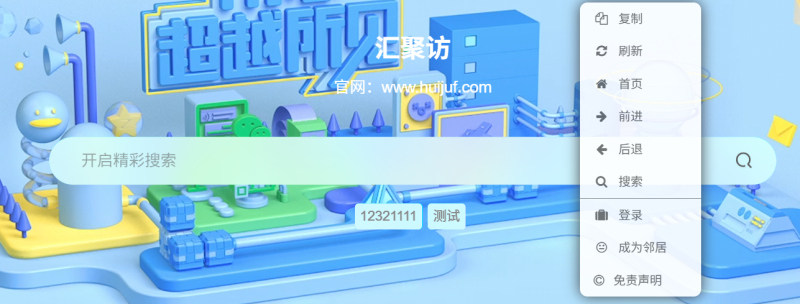
子比主题 – 自定义右键菜单
大家好,本地汇聚访给大家带来了子比主题的自定义右键菜单,这个效果还是挺不错的,菜单中有很多实用的功能,便捷的同时又防止了别的右键扒站,有喜欢的的自行部署吧! 演示效果: 代码部署: [hidecontent type="reply"] 将下面的代码放到网站统计HTML代码里面即可!里面的内容自己改动一下!! <style type="text/css"> /*www.huijuf.com*/ a {text-decoration: none;} div.usercm{background-repeat:no-repeat;background-position:center center;background-size:cover;background-color:#fff;font-size:13px!important;width:130px;-moz-box-shadow:1px 1px 3px rgba (0,0,0,.3);box-shadow:0px 0px 15px #333;position:absolute;display:none;z-index:10000;opacity:0.9; border-radius: 8px;} div.usercm ul{list-style-type:none;list-style-position:outside;margin:0px;padding:0px;display:block} div.usercm ul li{margin:0px;padding:0px;line-height:35px;} div.usercm ul li a{color:#666;padding:0 15px;display:block} div.usercm ul...
10个月前
建站笔记
2025-05-01
05-01
实用
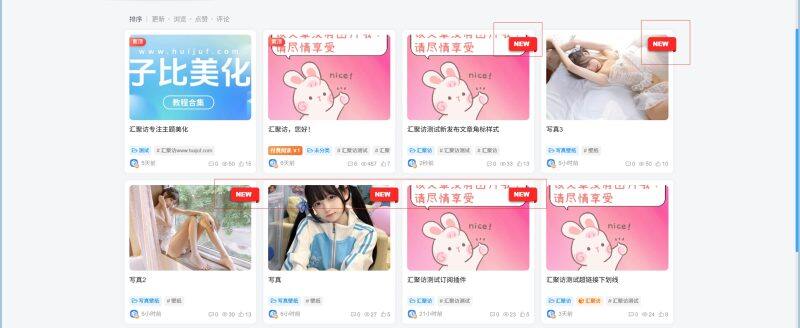
子比主题 – 新文章发布卡片列表角标
这是一款给子比主题添加的一款功能样式美化,部署完代码后,每当发布新文章右边都会有一个红色的New标签用来提醒用户,同时标签的颜色可自行更改,适配多种文章列表样式,有需要的朋友自行部署吧! 演示效果: 代码部署: [hidecontent type="reply"] PHPCSS 定位:/wp-content/themes/zibll/func.php添加以下代码即可: /*汇聚访www.huijuf.com*/ function add_new_label_to_post_title($title, $id = null) { if (is_admin() || !$id || !in_the_loop()) { return $title; } if (get_post_type($id) !== 'post') { return $title; } $post_time = get_the_time('U',...
10个月前
建站笔记
2025-09-26
09-26
实用
子比主题 – 首页NEW居中标题样式(两款)
这是子比主题的一款 首页NEW居中动态标题样式,之前也发过别的这样的样式,但是这个有个特点就是刷新网页的时候会动态加载,相比之前发的可能更加好看一点,有喜欢的自行部署吧! 演示效果: 第一款 第二款 代码部署: [hidecontent type="reply"] 定位:WP后台–>>外观–>>小工具–>>自定义HTML,将下面的代码丢里面即可!推荐放置位置:首页 - 主内容上面 样式一样式二 <div class="post-header"> <div class="post-title-wrap"> <span class="post-title">最新文章</span> <span class="post-dot"></span> </div> <div class="post-subtitle"> <span class="line left-line"></span> <span class="subtitle-text">学无止境,活到老,学到老</span> <span class="line right-line"></span> </div> </div> <style> .post-header{display:flex;flex-direction:column;align-items:center;margin:5px...
6个月前
建站笔记
2025-05-06
05-06
实用
子比主题 – 评论区添加随机夸夸功能
有很多人在网站浏览需要回复,有的比较嫌麻烦不愿意打字,也会收到一些各种评论相对比较杂乱,今天分享一个用夸夸功能,来替代传统的评论一言,将它们分开使用,先看看效果图,再考虑使用不使用! 演示效果: 代码部署: [hidecontent type="reply"] ①CSS②PHP③PHP注意事项 css代码自行本地化 或直接下载 .kuakua-first-box{ margin: auto; width: 440px; border-radius: 16px; bottom: auto; min-height: 10rem; left: 50%; position: fixed; right: auto; top: 50%; transform: translate(-50%, -50%); background: #fff; z-index: 1032; box-shadow:...
10个月前
建站笔记
上一页
1
2
3
4
5
…
43
下一页
跳转
欢迎光临~
随便逛逛
博客标签
新窗口打开
复制链接地址
复制选中文本
粘贴文本
站内搜索
百度搜索
复制此图片
下载此图片
用户协议
免责声明
复制地址
关闭热评
轉為繁體
切换模式
热评
登录
没有账号?立即注册
邮箱
验证码
发送验证码
记住登录
账号密码登录
登录
用户名或邮箱
登录密码
记住登录
找回密码
|
免密登录
登录
社交账号登录
QQ登录
微信登录
使用社交账号登录即表示同意
用户协议
、
隐私声明
注册
已有账号,立即登录
设置用户名
邮箱
验证码
发送验证码
设置密码
注册
已阅读并同意
用户协议
、
隐私声明
扫码登录
使用
其它方式登录
或
注册
扫码登录
扫码登录即表示同意
用户协议
、
隐私声明
最近因事业繁忙,随缘更新
如有不便,敬请谅解!
开通会员享特权
专属内容无限访问
下载权限提升至最高级
专属子比付费美化优惠
免费下载更多精品资源
¥29.9
¥39.9
Vip会员 · 立省30元
立即开通
每日签到
在线
扫码关注公众号
获取更多专属内容和最新资讯
展开全屏
返回顶部






 汇聚访
汇聚访